 2023-03-06
A sensor is a device or element that detects a physical or chemical condition and produces a response that can be used as information. In an electronic system, that information is usually represented by an electrical signal or a change in an electrical property.
A temperature sensor responds to temperature. A light sensor responds to light. A pressure sensor responds to pressure. The sensor provides information about the condition; another part of the system may display the result, record it or decide what to do next.
That distinction helps explain how sensors fit into everyday products. A sensor can tell a controller that a room is dark, but it is not necessarily the part that switches the lamp on.
How Does a Sensor Work?
The process starts with the quantity being detected. A change in temperature, light, pressure or another condition causes a sensing element to respond. Supporting electronics may then convert, amplify or process that response into a useful output.
Temperature changes → the sensing element responds → the circuit reads the response → a display shows the temperature or a controller takes action.
Not every sensor contains every stage. Some provide a basic change in resistance or another electrical property and need an external circuit to read it. Others include signal processing and a digital interface within the same device.
An NTC thermistor is a useful example of the first case. Its resistance decreases as its temperature rises. A circuit can measure that resistance-related change and use the device’s characteristics to estimate temperature. Murata’s NTC thermistor explanation describes this resistance-temperature relationship.
A digital temperature sensor may perform conversion internally and provide a numerical result through a communication interface. The TI TMP117, for example, provides temperature information through an I2C-compatible interface. These are different ways to report temperature, not evidence that all temperature sensors work identically.
Common Sensor Types and Everyday Examples
One straightforward way to group sensors is by what they detect. This is often more useful for a beginner than starting with package shapes or communication protocols.
| Sensor category | What it detects | Example use |
|---|---|---|
| Temperature | Temperature at or near the sensing element, depending on its design. | Monitoring a circuit board or controlling a heating system. |
| Light | Light within the sensor’s supported spectral range. | Adjusting a display in response to ambient lighting. |
| Pressure | Pressure relative to the device’s specified reference. | Monitoring pressure in an air or fluid system. |
| Motion or acceleration | Movement-related quantities, depending on the sensing method. | Detecting device movement or measuring vibration. |
| Magnetic field | A magnetic field or a change in it. | Detecting the position of a nearby magnet. |
| Humidity | Humidity in the surrounding environment. | Monitoring air conditions in a room or enclosure. |
These categories can overlap in a finished product. A wearable device may combine several sensors, while an industrial assembly may include both temperature and pressure measurement. The product’s overall function does not tell you which individual sensor it uses.
For a broader comparison, continue to our guide to sensor types. This article focuses on the basic idea and signal path rather than listing every sensing technology.
What Is the Difference Between Analog and Digital Sensors?
The distinction usually describes how the sensor’s information is represented at its output. An analog output can vary continuously over a range. A digital output represents information using discrete states or encoded data.
For example, an analog temperature sensor may produce a voltage related to temperature. A microcontroller can use an analog-to-digital converter, or ADC, to turn that voltage into a number. A digital temperature sensor may provide an already converted value through an interface such as I2C.
A digital output does not always contain a full numerical measurement. Some devices provide a switching output that indicates whether a threshold or condition has been detected. Read the device documentation to distinguish a measured value from a simple event signal.
Also, digital does not automatically mean more accurate. The output format alone does not establish measurement error, response time or suitability for an application. Those depend on the specific device and operating conditions.
Once the output type is understood, the next question is how the receiving circuit reads it. Our sensor interface guide covers that next stage.
Sensor, Controller and Actuator: Three Different Jobs
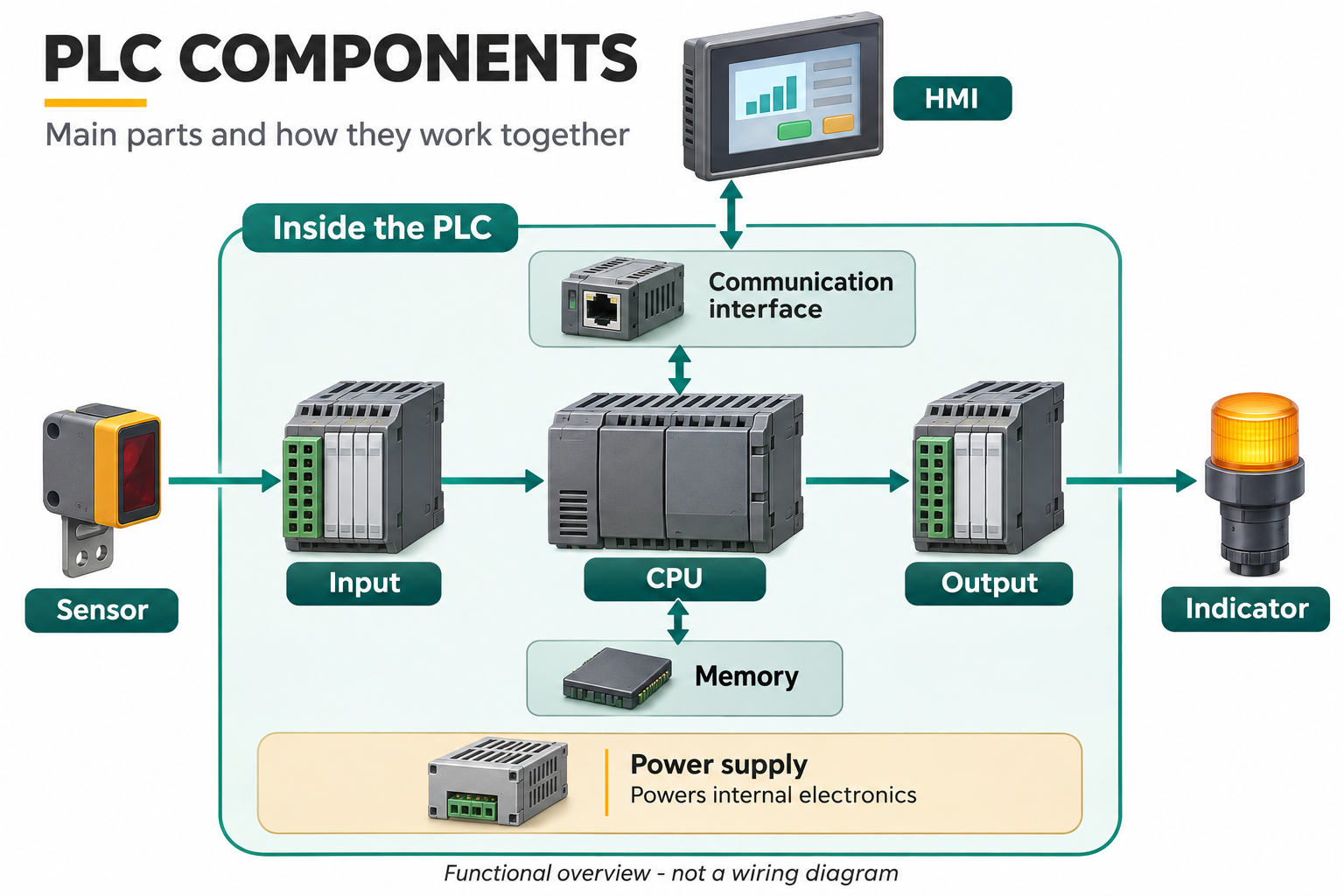
A sensor detects a condition. A controller interprets information and applies a rule or program. An actuator produces a physical action. These functions may share an enclosure, but they should not be treated as interchangeable.
Some systems only measure and display information. Others use feedback: the controller observes the sensor reading, changes an output and checks the result again. The presence of a sensor does not by itself mean the system contains automatic control.
This also explains the difference between a temperature sensor, a thermometer and a thermostat. A sensor is the detecting element or device. A thermometer is an instrument that reports temperature. A thermostat performs temperature-control switching or signalling. Depending on the design, an instrument or thermostat may contain a sensor and additional circuitry.
A Sensor Element Is Not Always a Complete Module
When browsing electronic components, the word “sensor” may refer to several levels of integration. Understanding the difference prevents a common mistake: expecting a small component to include all the connections and functions of a finished module.
- Sensing element: The part that responds to the measured condition. It may need excitation, signal conditioning or conversion elsewhere in the circuit.
- Sensor IC: An integrated device that combines sensing with some electronics. Its included functions depend on the specific model.
- Sensor module: An assembly that may add a PCB, connectors, supporting components or a regulator. Check what is actually included.
- Measuring instrument: A more complete product that may include a display, enclosure, controls and other functions needed by the user.
A module’s supply connection, for example, may not have the same requirements as the bare IC mounted on it. Likewise, two modules using a similar sensing element can differ in their supporting circuitry and outputs.
The EASYIEE electronic component catalogue is a starting point for exploring component categories. Use the exact part documentation to confirm whether a listing represents a bare device, a module or another assembly.
What Does a Sensor Reading Actually Tell You?
A reading represents the condition detected by the sensor under its operating conditions. It does not necessarily describe the entire system. A temperature sensor on a PCB, for instance, does not automatically measure the temperature of every nearby component or the surrounding room.
Several terms help explain a reading. Measurement range describes the supported span. Accuracy concerns how close the result is to the relevant reference or true value under stated conditions. Resolution describes the smallest reported increment or distinguishable change. Response time describes how quickly the device responds to a change.
A display with more digits is not proof of better accuracy. Nor does a supported interface prove that two sensors can be substituted without changes. The sensing range, electrical requirements, data format and application conditions still matter.
For learning, start by identifying three things: what is being detected, how the sensor reports it and what the rest of the system does with that information. Those questions make a complex-looking device much easier to understand.
Where to Go Next
If you want to compare what different sensors detect, explore the sensor types guide. If you need to understand how a controller receives the result, move on to sensor interfaces. If you already have a device in mind, use its full manufacturer part number and datasheet rather than relying on a general category name.
For a component enquiry, you can send EASYIEE the identified part number and quantity. Keep a request for an exact device separate from a request for an alternative that still needs technical review.
The central idea is simple: a sensor turns a condition in the world into information a system can use. Understanding what it detects, what it outputs and which functions belong to other parts of the system is the foundation for understanding any sensor application.